What is a Computer?
The Origins of the Computer
The history of the computer has roots that extend beyond the 20th century, but the first modern electronic computers emerged in the 1940s. Since then, evolution has been dizzying, transforming not only technology but also our way of life.
First calculating machines
Long before the digital age, humanity was already looking for ways to make mathematical calculations easier. Among the first calculating machines, the following stand out:
-
The abacus: Originating in Mesopotamia around 2400 BC, this simple but effective instrument allowed basic arithmetic operations to be performed.
-
The Pascaline: Invented by Blaise Pascal in 1642, this mechanical machine could add and subtract automatically.
-
The Analytical Engine: Designed by Charles Babbage in 1837, although it was never completely built, it is considered the first design for a general-purpose computer.
These inventions laid the foundation for the development of more complex calculating machines and, eventually, electronic computers.
The era of electronic computers
The real leap towards modern computers came with the era of electronic computers. The ENIAC (Electronic Numerical Integrator and Computer), completed in 1945, was one of the pioneers, occupying an entire room and weighing more than 27 tons. This electronic colossus marked the beginning of a new era in computing.
Other important milestones in this era include:
-
UNIVAC I (1951): The first commercial computer, used for the US census.
-
IBM 701 (1952): IBM’s first scientific computer, which paved the way for business computing.
In the following decades, computers became increasingly smaller and more powerful. The arrival of microprocessors in the 1970s marked the beginning of the era of personal computers. This miniaturization continued at an accelerated pace, bringing us to the current era.
Today, smartphones are, at their core, incredibly powerful and versatile computers. With processing capabilities that rival those of some desktop computers, these devices can perform complex tasks, from video editing to running artificial intelligence, all in a form factor that fits in the palm of your hand.
This transformation, from room-sized machines to pocket-sized devices, illustrates not only technological advancement, but also how computers have become deeply integrated into our daily lives, changing the way we work, communicate, and access information.
The journey from the first calculating machines to today’s devices has been long and fascinating. As technology continues to advance, computers continue to evolve and diversify. This evolution has not only led to more powerful and compact devices, but also to a wide variety of computer types, each designed to meet specific needs in our increasingly digitalized society.
Types of Computers
The evolution of technology has given rise to a wide variety of computers, each designed to satisfy different needs and uses. The main types of computers that exist today are described below:
Personal computers
Personal computers, also known as PCs, are the most common and versatile computers. They are mainly divided into two categories:
-
Desktop Computers: These are traditional computers found in homes and offices. They offer a good balance between performance and cost, and are ideal for tasks that require a large screen and a full keyboard. These systems are easily upgradeable and customizable, making them popular with users who need specific performance for their tasks.
-
Laptops or Laptops: Designed for mobility, these computers integrate the screen, keyboard and trackpad in a single device. They are perfect for working or studying in different places. Modern laptops can be as powerful as many desktop computers, offering an excellent balance between performance and portability.
In addition to these, there are other variants of personal computers that are worth mentioning:
-
Tablets: These are touch screen devices that offer great portability. Although less powerful than laptops, they are ideal for consuming multimedia content, browsing the Internet and using simple applications.
-
Smartphones: Although primarily telephones, modern smartphones are actually small pocket computers, capable of performing many of the tasks of a traditional computer.
-
Single Board Computers: Like the Raspberry Pi, they are small computers complete on a single circuit board. They are popular for DIY, education and prototyping projects.
Servers
Servers are computers designed to provide resources, services or data to other computers on a network. They are used in businesses, data centers, and to host websites. The main features of the servers include:
-
High availability: They are designed to operate continuously, with minimal downtime.
-
Scalability: They can handle an increase in workload by adding resources.
-
Security: They incorporate advanced security features to protect sensitive data.
-
Performance: They are optimized to handle multiple simultaneous requests efficiently.
Servers can vary in size and capacity, from small servers for small businesses to large systems that occupy entire rooms in data centers.
Supercomputers
Supercomputers are the most powerful computers in the world, designed to perform extremely complex calculations. They are used in scientific research, climate simulations, big data analysis, among others. Some characteristics of supercomputers are:
-
Massive processing power: They can perform billions of calculations per second.
-
Parallelism: They use thousands of processors working simultaneously.
-
Advanced cooling: They require sophisticated cooling systems due to the heat generated.
-
Specialized software: They use operating systems and software designed specifically for high-performance computing.
Examples of supercomputer applications include:
- Climate modeling and weather prediction
- Simulations in particle physics
- Nuclear weapons design and testing
- Genomic and pharmaceutical research
These supercomputers represent the cutting edge of computing technology and are fundamental to advances in science and engineering.
Main Components of a Computer
The main components of a computer are the essential elements that allow it to function. These can be classified into two main categories: hardware and software. Each of these components plays a crucial role in the performance and functionality of the system.
Hardware refers to all the physical and tangible parts of the computer. These are the components that you can see and touch, and that perform the processing, storage, and data input/output operations. On the other hand, software is the set of instructions and programs that tell the hardware what to do and how to do it.
The interaction between hardware and software is essential for the operation of a computer. Hardware provides the physical capability to perform operations, while software directs these operations and provides the interface for users to interact with the machine.
Understanding these main components is valuable knowledge that can help us if we ever decide to build our own computer. Below, we will explore each of these components in detail.
Hardware
Hardware is the physical and tangible part of a computer. These components perform data processing, storage, and input/output operations. The main hardware components include:
-
Central Processing Unit (CPU): The CPU is the “brain” of the computer. It executes instructions, performs calculations, and coordinates the activities of other components. Modern CPUs can contain multiple cores, allowing parallel processing of tasks.
-
RAM Memory (Random Access Memory): RAM is the working memory of the computer. Temporarily stores data and instructions for quick access by the CPU. More RAM generally allows you to run more programs simultaneously and handle more complex tasks.
-
Storage: Storage is a crucial component in any computer. Provides space to save the operating system, applications and user data. In early computers, this could be in the form of magnetic tapes or primitive hard drives.
-
Motherboard: The motherboard is the central component that connects and allows communication between all other components of the computer. It contains circuits and connectors for the CPU, RAM and other devices. The motherboard largely determines the expandability and upgradeability of the system.
-
Peripherals: They are external devices that connect to the computer to provide data input or output. These include input devices such as keyboards and, in early computers, punch card readers, as well as output devices such as monitors and printers. The peripherals allow interaction between the user and the machine, facilitating the entry of data and the visualization of results.
It is important to note that, contrary to popular belief, having more RAM does not necessarily make a computer better. The component that really determines the performance of a device is the CPU. Although RAM can improve system performance to some extent, the CPU has its own inherent limitations that largely define the capabilities of the computer. This is why the technology industry continues to develop more powerful CPUs.
While RAM plays a role in overall system performance, its primary function is to provide temporary storage for data and instructions that the CPU needs to access quickly. However, even with a large amount of RAM, a system with a weak CPU will still have significant limitations in its performance.
Software
Software is the intangible but essential component of a computer. It consists of a set of instructions, data, and programs that tell the hardware what to do and how to do it. Software is what transforms a set of electronic components into a versatile and functional tool.
Software Types:
-
System Software: It is the fundamental software that allows the basic operation of the computer. It manages hardware resources and provides a platform for other applications to run. Includes the operating system, device drivers, and system utilities.
-
Application Software: These are programs designed to perform specific tasks for the user. These can range from word processors and spreadsheets to video editing and video game software.
-
Development Software: These are tools used by programmers to create, debug and maintain other software programs. They include integrated development environments (IDE), compilers, and debuggers.
-
Middleware Software: Acts as a bridge between different applications or between software and hardware. It is crucial in network environments and in system integration.
Software Life Cycle:
Software development follows a structured process known as the software development life cycle (SDLC). This cycle begins with the requirements analysis, where the client’s needs are identified and the project objectives are defined. During this phase, the functional and non-functional requirements of the software are documented, thus establishing the foundation for the rest of the process.
The design phase follows the analysis, where the system architecture is created and user interfaces are designed. Developers define the data structures, the relationships between them, and the main algorithms that the software will use. This stage is crucial to translate the requirements into a concrete plan for implementation.
Implementation is where the design becomes actual code. Programmers write the source code using specific programming languages and following the specifications established in the previous phases. During this stage, code reviews are performed to ensure quality and compliance with development standards.
Once the code is written, the testing phase begins. Here, the software undergoes various types of tests to verify its functionality, performance and reliability. Errors are identified and corrected, and adjustments are made to improve product quality.
Deployment occurs when the software is ready for use. This involves installing the software in the production environment, migrating data if necessary, and training end users. Documentation and user manuals are also provided at this stage.
Finally, maintenance is a continuous phase that begins after deployment. It includes fixing bugs, making updates and improvements, and adapting the software to new requirements or environments. Maintenance ensures that the software remains useful and efficient over time.
This cycle is not necessarily linear and can vary depending on the development methodology used, but generally includes these fundamental phases for creating and maintaining quality software.
Computer Architecture
Computer architecture refers to the design and organization of the fundamental components that make up a computer system. This structure defines how different elements interact to process information and execute tasks.
The von Neumann model, proposed by John von Neumann in 1945, remains the basis of most modern computer architectures. This model introduces the revolutionary concept of “stored program”, where both instructions and data are stored in the same memory, allowing programs to be easily modified.
The von Neumann model consists of four main components:
-
Processing Unit (CPU): Executes instructions and performs calculations.
-
Control Unit: Coordinates computer operations.
-
Memory: Stores data and instructions.
-
Input/Exit Devices: They allow communication with the outside world.
Central Processing Unit (CPU)
The CPU, considered the “brain” of the computer, is responsible for executing program instructions and performing necessary calculations. Its design has evolved significantly since the early days of computing.
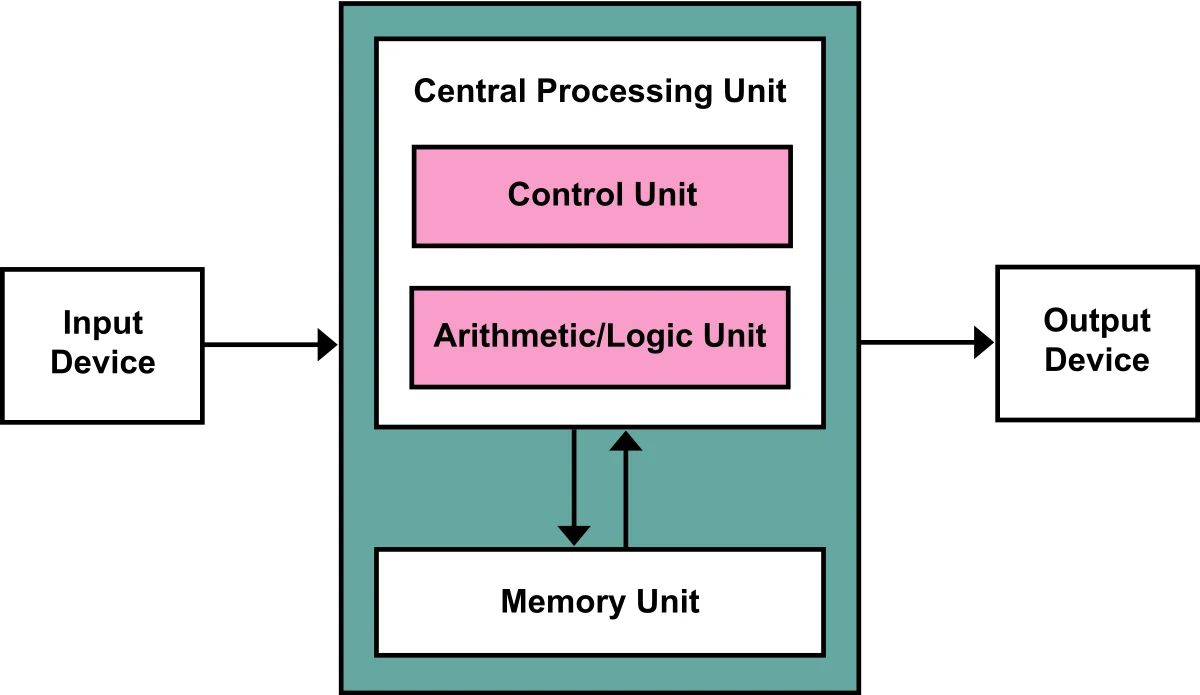
In early computers, the CPU was a relatively simple component, capable of performing basic operations. However, as technology has advanced, modern CPUs have reached impressive levels of complexity and performance.
One of the most significant innovations in CPU design has been the introduction of multiple cores. Multicore processors allow a single chip to contain multiple processing units, each capable of executing instructions independently. This has led to a dramatic increase in parallel processing capacity, allowing computers to handle multiple tasks simultaneously with greater efficiency.
Another important feature of modern CPUs is the inclusion of cache memory. This is a small amount of fast access memory built directly into the processor. The cache stores frequently used data and instructions, reducing the time required to access this information and therefore significantly increasing overall system performance.
Memory
Memory in a computer system plays a crucial role in the performance and functionality of the device. It is mainly divided into two types: primary (or main) memory and secondary memory.
Primary memory, commonly known as RAM (Random Access Memory), is a type of volatile, fast-access storage. RAM temporarily stores data and instructions that the CPU needs for its immediate operations. The more RAM a system has, the more applications and data it can handle simultaneously without slowing down.
On the other hand, secondary memory, such as hard drives (HDDs) or solid state drives (SSDs), provide long-term, non-volatile storage. These devices retain information even when the computer is turned off, allowing permanent storage of programs, files and operating system data.
The memory hierarchy in a modern computer is complex and includes several levels, each with different speeds and capacities. This hierarchy is designed to balance access speed, storage capacity, and cost, thereby optimizing overall system performance.
Input/output devices
Input/output (I/O) devices are essential for the interaction between the computer and the outside world. These devices allow the introduction of data to the system and the presentation of results to the user, facilitating bidirectional communication essential for the practical operation of any computer system.
Input devices are those that allow the user or other systems to enter data into the computer. Some common examples include:
-
Keyboard: Allows the entry of text and commands.
-
Mouse: Facilitates graphical interaction and navigation.
-
Microphone: Captures audio input for voice recognition or recording.
-
Webcam: Captures images and video for video conferencing or computer vision applications.
-
Scanner: Digitizes physical documents for storage or processing.
On the other hand, output devices are responsible for presenting the information processed by the computer in a way that is understandable to the user. Some examples include:
-
Monitor: Displays visual information, including text, images and video.
-
Speakers: Play audio, from simple alerts to high-fidelity music.
-
Printer: Produces physical copies of digital documents.
-
Projector: Allows you to display the computer screen on a larger surface.
The development of standard interfaces such as USB (Universal Serial Bus) has greatly simplified the connection and configuration of I/O devices, allowing greater flexibility and ease of use for end users.
As technology advances, the line between input and output devices becomes increasingly blurred, with many modern devices fulfilling both functions. This convergence, along with the growing importance of network connectivity and cloud computing, is constantly redefining the role and capabilities of I/O systems in contemporary computer architecture.
Modern computer architecture has evolved, but is still based on these fundamental principles. Advances include:
-
Multicore architectures: Multiple processing units on a single chip.
-
Cache memory: Small, quick-access memory for frequently used data.
-
Instruction pipelines: Allow the simultaneous execution of multiple instructions.
The Impact of Computers on Society
Computers have transformed virtually every aspect of modern society. Its influence extends to almost every area of our daily lives, from how we work and learn to how we communicate and entertain ourselves. This technological revolution has redefined the way we interact with the world around us, creating new opportunities and challenges in the process.
-
At work: Productivity and efficiency have increased in almost all industries. Computers have automated many repetitive tasks, allowing workers to focus on more creative and strategic activities. They have facilitated the management of large amounts of data, improving decision making and optimizing processes. In addition, they have made remote work possible, making schedules more flexible and allowing global collaborations in real time.
-
In education: They facilitate access to information and allow new forms of learning. Computers have democratized knowledge, making vast digital libraries available to students around the world. They have introduced interactive and multimedia tools that enrich the educational experience, adapting to different learning styles. Online education platforms have opened opportunities for distance learning and continuing education.
-
In communication: They have revolutionized the way we connect with others, especially through the internet. Social networks, email and instant messaging applications have shortened distances, allowing instant communications on a global level. They have transformed how we share information, from text and photos to live videos, creating new forms of expression and social connection.
-
In entertainment: From video games to streaming content, they have changed how we have fun. Computers have opened up a world of possibilities in digital entertainment, from immersive games to streaming platforms that offer instant access to movies, series and music. They have allowed the creation of content by users, democratizing the production and distribution of entertainment.
This digital transformation has brought with it numerous benefits, but it has also posed new challenges. Issues such as digital privacy, cybersecurity and the technological gap have become crucial topics in our society. As computers continue to evolve and become more integrated into our lives, their impact on society will continue to be profound and multifaceted, shaping the future of how we live, work and relate.
The Future of Computers
As technology advances, computers continue to evolve. Artificial intelligence, quantum computing and increasing integration with everyday devices promise to take the capabilities of computers to new horizons, posing both opportunities and challenges for society.
In conclusion, the computer is much more than a simple machine; It is a tool that has redefined our relationship with information, communication and technology. Understanding its fundamentals is essential to navigate and make the most of the digital world in which we live.
Sources: Youtube
You might also be interested in… What is programming?